
How to Blur License Plates in Dashcam Video Online
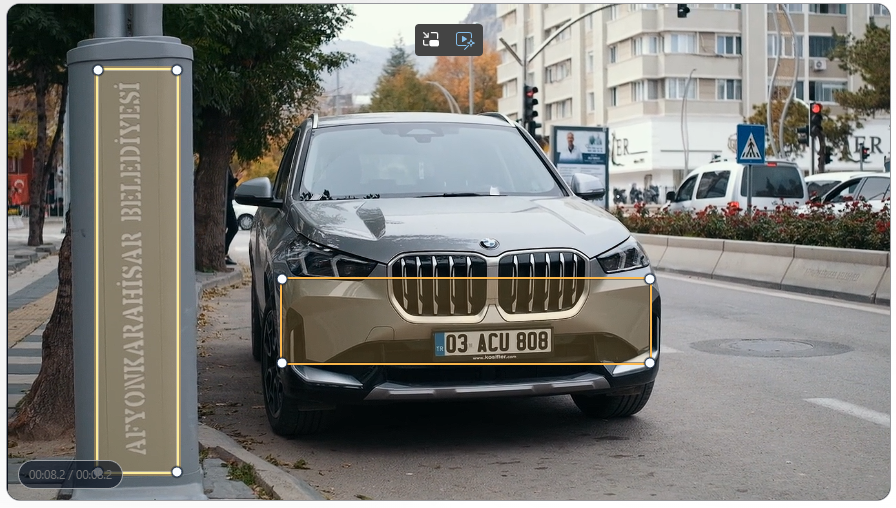
Detect and anonymize visible license plates
Process the original clip, then review traffic, glare, turns, and low-light frames before publishing.
A reliable dashcam setup
FaceBlurify now includes a dedicated license plate video tool, so the fastest workflow is to upload your clip, choose the anonymization effect you want, and run automatic plate redaction.
Use the license plate tool here: /en/tools/blur-license-plates-videos/
Before and after
| Before | After |
|---|---|
 |  |
Step-by-step plate redaction flow
- Upload your dashcam clip.
- Choose Blur, Mosaic, or Black box.
- Run the plate anonymization pass.
- Review the result around traffic, turns, and low-light segments.
- If you prefer another look, reopen the same clip and rerun with a different effect.
- Reset when you want to start over from scratch.
What this tool is best for
- License plates.
- Visible plates on moving or parked vehicles.
- Dashcam clips.
- Parking-lot and street footage.
Tips for moving plates
Dashcam clips often have motion blur and perspective changes. A few practical tactics:
- Review short stretches with heavy traffic or camera shake frame-by-frame.
- Rerun with Black box if you want the strongest visible masking.
- Split very long clips into shorter segments when the traffic scene changes a lot.
Combine with face anonymization when needed
If people are visible, run the face or full-body tools separately for complete privacy coverage. Manual zones still help for screens, badges, logos, or reflections that need a separate pass.
Quick review checklist
- Scrub frame-by-frame around turns, braking, and camera shake.
- Check the first and last frames of your trimmed range.
- Verify the export looks correct after platform compression.
Related guides
- Blur faces and license plates in the same video
- Blur license plates before uploading a video
- Blur faces only in part of a video
- Selective blur workflow
- Video anonymization best practices
- Detection missed someone? fixes
FAQ
Can I switch effects without reuploading?
Yes. Reopen the same clip in the result view and rerun it with another effect.
Is this workflow good for legal evidence handling?
It is useful operationally, but legal requirements vary by jurisdiction and process.